Form I-9 & E-Verify
Last updated: August 3, 2026
Overview
Form I-9 is used to verify every employee’s identity and authorization to work in the United States.
If your company participates in E-Verify, Zeal can also electronically verify an employee’s work authorization by submitting information from the completed Form I-9 to the Department of Homeland Security (DHS) and the Social Security Administration (SSA).
This guide explains how Form I-9 and E-Verify work together, what employers are responsible for, and how the process is managed in Zeal.
Before You Begin
Before completing Form I-9, make sure:
The employee has accepted their job offer.
The employee has started or is scheduled to start work.
Your company is enrolled in E-Verify (if applicable).
The employee has access to their identity and employment authorization documents.
Note: Form I-9 is required for all U.S. employers, regardless of whether they participate in E-Verify.
Understanding Form I-9 and E-Verify
Although they’re closely related, Form I-9 and E-Verify serve different purposes.
Form I-9
Form I-9 is a federal employment eligibility verification form completed for every newly hired employee.
It documents:
The employee’s identity
Their authorization to work in the United States
The identity and work authorization documents they presented
Federal law requires employers to complete Form I-9 for every employee and retain the completed form.
E-Verify
E-Verify is an online system operated by the Department of Homeland Security (DHS) in partnership with the Social Security Administration (SSA).
If your company participates in E-Verify, Zeal submits information from the completed Form I-9 to E-Verify, which compares it against government records to confirm the employee’s employment eligibility.
How the Process Works
The I-9 and E-Verify process consists of five steps.
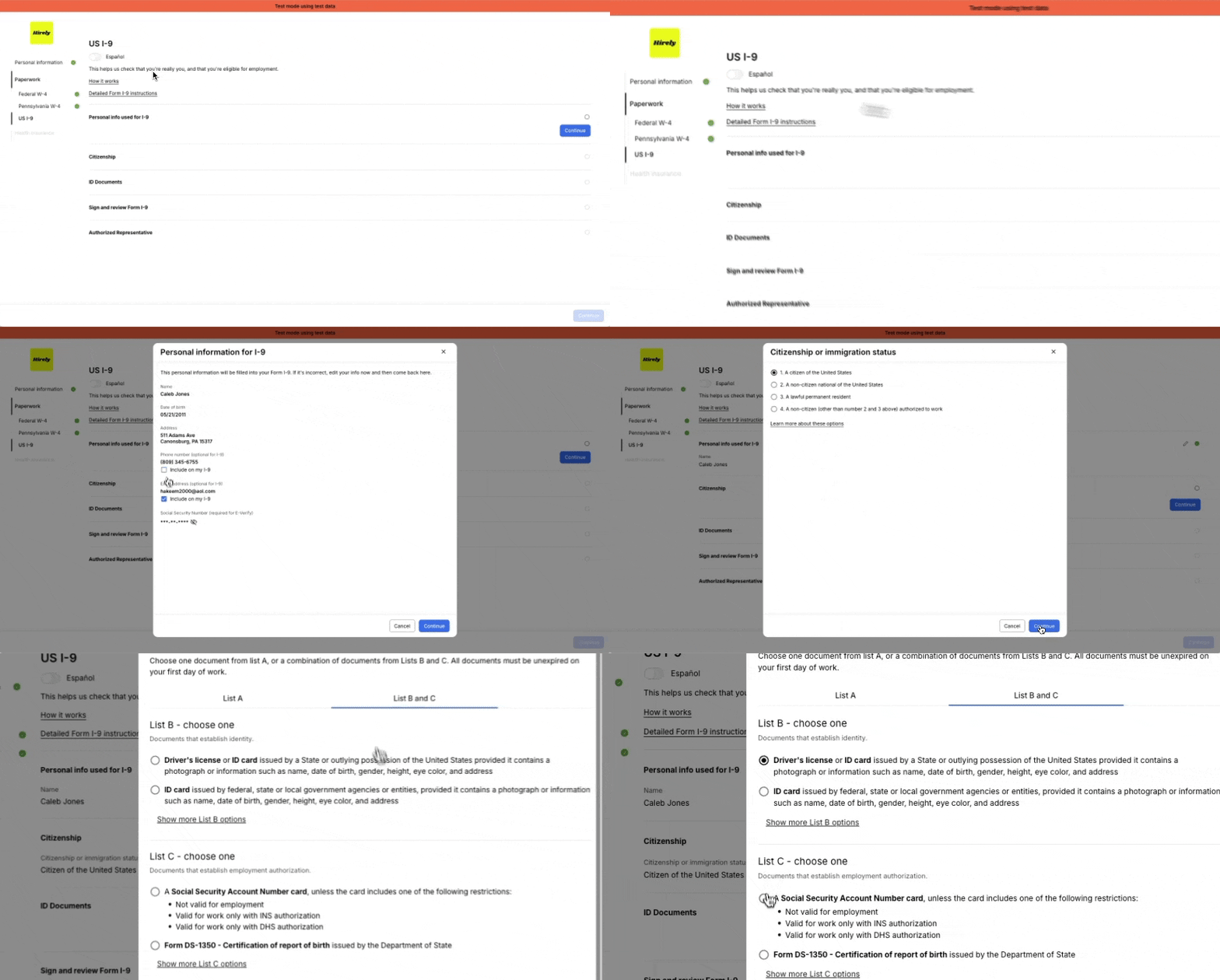
Step 1: Employee Completes Section 1
On or before their first day of employment, the employee completes Section 1 of Form I-9.
This includes:
Personal information
Citizenship or immigration status
Social Security Number (required for E-Verify)
Electronic signature
Step 2: Employer Reviews Employee Documents
Within three business days of the employee’s first day of work, the employer reviews the employee’s identity and work authorization documents.
The employee must present either:
One List A document, or
One List B document and one List C document
Employers are responsible for determining whether the documents reasonably appear to be genuine and relate to the employee presenting them.
If documents are reviewed remotely, uploaded images should be clear and legible.
Related Article: 📄 Review Form I-9 Documents
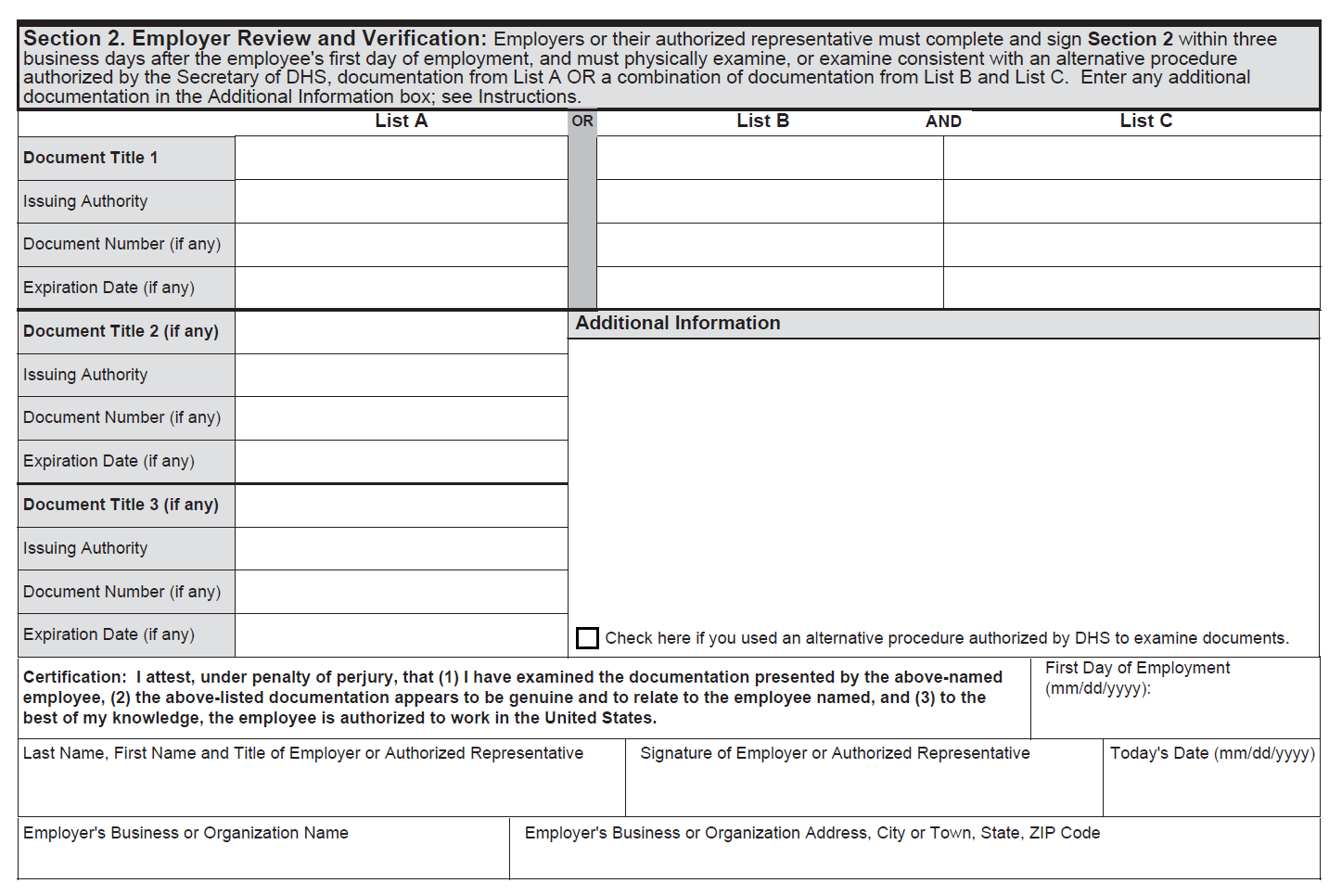
Step 3: Employer Completes Section 2
After reviewing the employee’s documents, complete Section 2 of Form I-9.
This includes:
Employee start date
Document information
Employer certification
Before submitting the information, Zeal validates the form for common errors. If any required information is missing, you’ll be prompted to correct it before the form can move forward.
Step 4: Zeal Submits the E-Verify Case
If E-Verify is enabled for your company, Zeal submits the completed Form I-9 information to E-Verify.
The information is compared against records maintained by:
Department of Homeland Security (DHS)
Social Security Administration (SSA)
Once processing is complete, E-Verify returns a case result.
Step 5: Review the Case Result
Most E-Verify cases receive one of the following results:
Status | Description |
|---|---|
Employment Authorized | Employment eligibility has been confirmed. |
E-Verify Needs More Time | DHS requires additional time to review the case. |
Tentative Nonconfirmation (Mismatch) | The employee’s information couldn’t be matched to government records. |
Case in Continuance | Additional review is in progress. |
Close Case & Resubmit | A new case must be created with corrected information. |
Final Nonconfirmation | Employment eligibility couldn’t be confirmed. |
For instructions on responding to each result, see 📄 Resolve E-Verify Case Results
Employer Responsibilities
As the employer, you’re responsible for:
Ensuring Form I-9 is completed on time.
Reviewing employee identity and work authorization documents.
Completing Section 2 within three business days of the employee’s first day of work.
Responding appropriately to any E-Verify case results.
Retaining Form I-9 records in accordance with federal requirements.
Troubleshooting
Why wasn’t my employee submitted to E-Verify?
Zeal may prevent submission if:
Required information is missing.
The employee’s start date is outside the allowed timeframe.
Form I-9 contains validation errors.
Required documents are incomplete or unreadable.
Correct the issue and resubmit the employee for verification.
Does every employer need to use E-Verify?
No. Participation in E-Verify depends on your organization’s requirements and applicable federal or state laws.
However, every U.S. employer must complete Form I-9 for newly hired employees.
Can I complete Form I-9 without an employee’s Social Security Number?
Yes, but if your company uses E-Verify, an SSN is required before an E-Verify case can be created. This may delay employment verification.
What Happens Next?
After Form I-9 has been completed and, if applicable, the E-Verify case has been resolved, the employee is ready to continue through onboarding and be included in payroll.
Related Articles
Zeal is a financial technology company, not an FDIC insured depository institution. Banking services provided by Bangor Savings Bank, Member FDIC. FDIC insurance coverage protects against the failure of an FDIC insured depository institution. Pass-through FDIC insurance coverage is subject to certain conditions.
Mastercard® Debit Card is issued by Bangor Savings Bank, Member FDIC, pursuant to license by Mastercard International Incorporated. Mastercard is a registered trademark, and the circle design is a trademark of Mastercard International Incorporated. Spend anywhere Mastercard is accepted.