Tax Setup
Last updated: August 3, 2026
Overview
Before you can run payroll, you’ll need to complete your federal and state tax setup.
Zeal uses this information to calculate payroll taxes, remit tax payments, and file required payroll tax returns on your behalf. Completing tax setup before your first payroll helps ensure taxes are paid and filed correctly.
As you onboard employees and add work locations, Zeal automatically identifies the tax jurisdictions your company needs and prompts you for any missing information.
Before You Begin
Before completing tax setup, make sure you’ve:
Completed Company Onboarding
Added your work locations
Started onboarding employees (recommended)
Note: Additional tax requirements may appear as you onboard employees in new states.
Step 1: Open Tax Setup
Navigate to:
Company Dashboard → Taxes
If any tax information is missing, you’ll see an alert listing the jurisdictions that still require action.
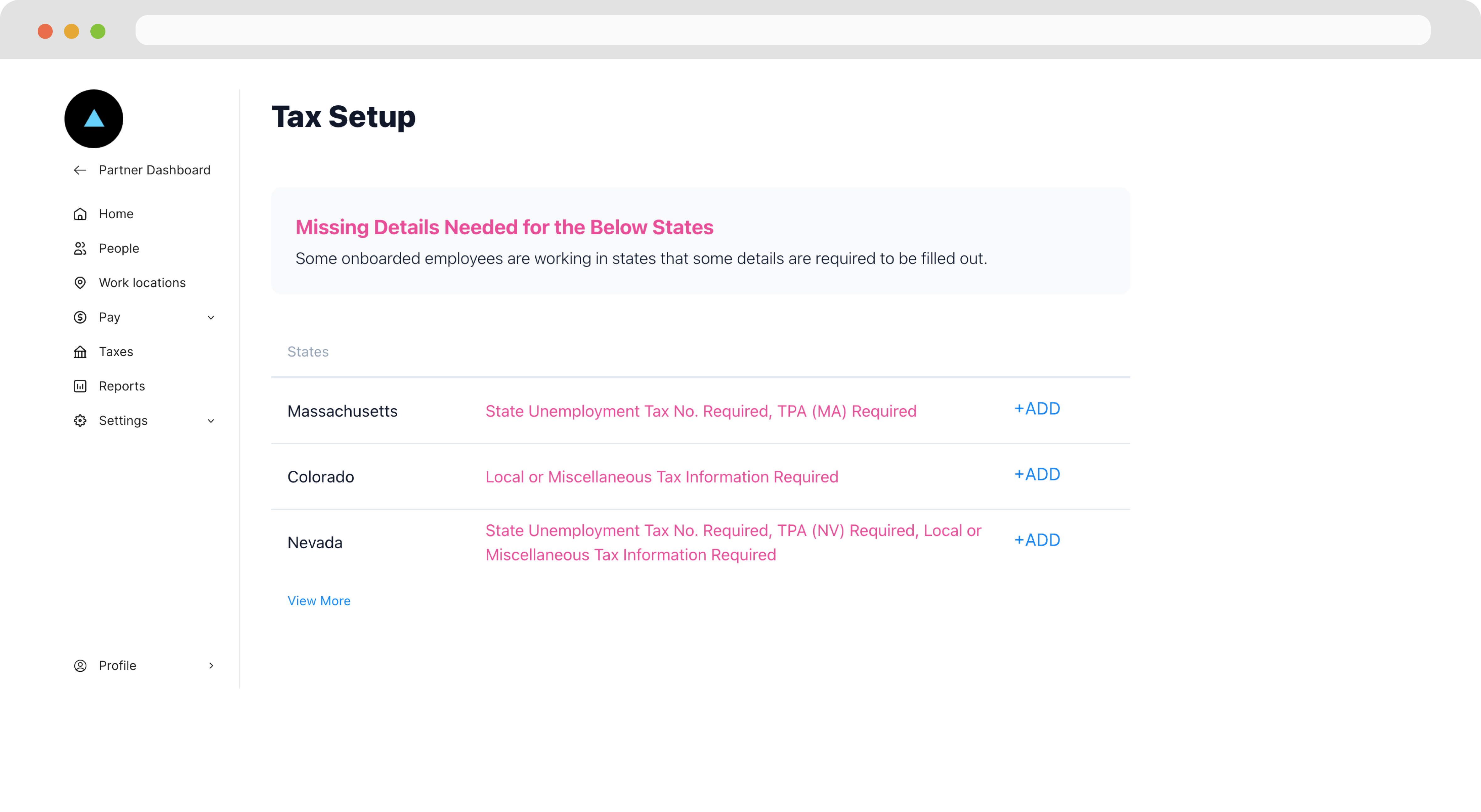
As you onboard employees or add work locations in new states, additional tax requirements may appear automatically. Review the Tax Setup page regularly until all required tax cards have been verified.
Step 2: Complete Federal Tax Setup
Federal tax cards contain the information Zeal needs to manage your federal payroll tax obligations.
Complete each required field and submit the card for review.
Step 3: Complete State Tax Setup
For each state where your employees live or work, Zeal may require one or more tax cards.
Select + Add next to the applicable state to begin.
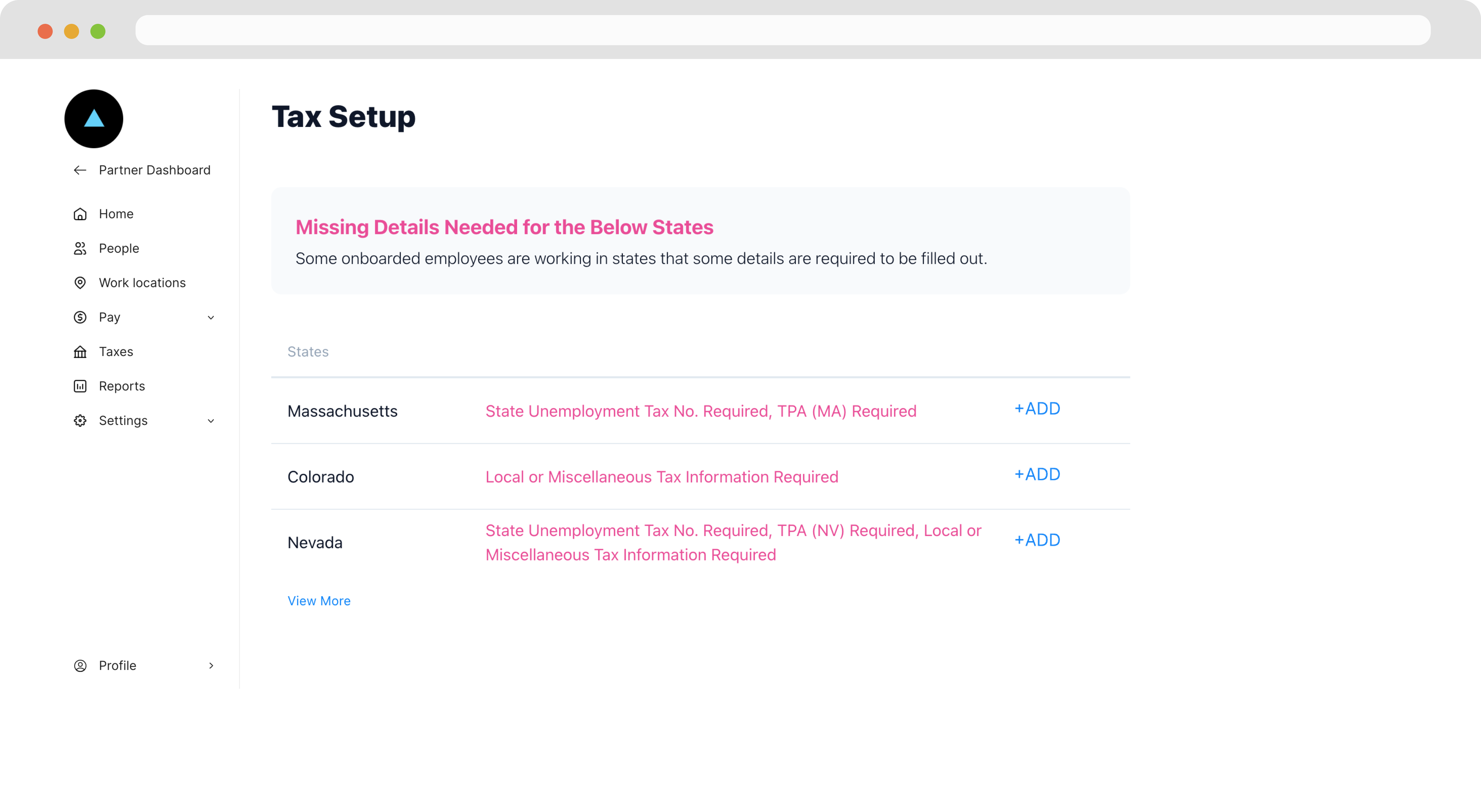
Payment tax cards allow Zeal to remit payroll tax payments.
Filing tax cards provide the information and authorizations Zeal needs to submit payroll tax returns on your behalf.
Most states include four tax cards:
Tax Card | Purpose |
|---|---|
SIT Payments | Allows Zeal to remit state income tax payments |
SIT Filings | Allows Zeal to file state income tax returns |
SUI Payments | Allows Zeal to remit unemployment taxes |
SUI Filings | Allows Zeal to file unemployment tax returns |
Some states may require additional local or miscellaneous tax information.
Step 4: Submit Your Tax Cards
Complete all required information for each card.
Some tax cards also require:
Power of Attorney
Third-Party Administrator (TPA) authorization
Electronic filing permissions
State-specific forms
After submission, Zeal will review and verify the information before using it for payroll.
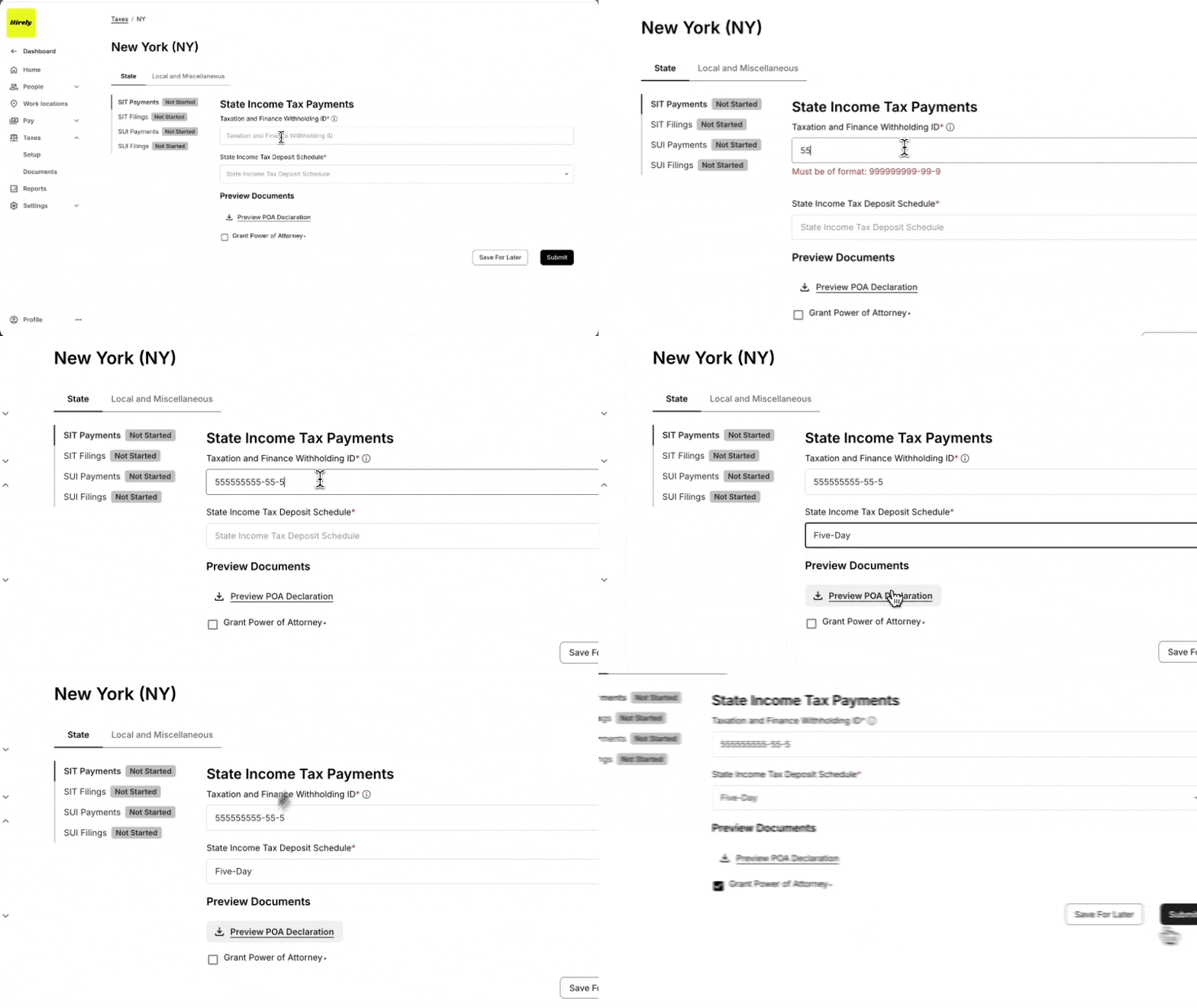
Note: Your tax cards don’t need to be verified immediately after submission. Zeal reviews submitted information and updates the status once verification is complete.
Understanding Tax Card Statuses
Each tax card displays its current status.
Status | Meaning |
|---|---|
Not Started | No information has been submitted. |
Pending | Information has been submitted and is awaiting Zeal verification. |
Incorrect | One or more fields couldn’t be verified. Update the requested information and resubmit the card. |
Verified | The information has been reviewed and approved by Zeal. |
If you update a verified tax card, its status will return to Pending until Zeal verifies the new information.
Troubleshooting
I don’t see any state tax cards.
State tax cards are generated based on your employees’ work and residence locations. If you haven’t added employees yet, you may only see your federal tax setup.
A tax card is marked “Incorrect.”
One or more fields couldn’t be verified by the applicable tax agency. Review the highlighted fields, make the requested updates, and resubmit the tax card.
Do I need to complete every tax card before running payroll?
You should complete all required tax cards as soon as possible. Missing tax information can delay payroll tax payments and filings, potentially resulting in penalties or interest.
Why is my tax card still Pending?
Tax cards remain in Pending while Zeal verifies the information you submitted. Verification times vary depending on the tax agency and the type of information being verified.
What Happens Next?
Once your required federal and state tax cards have been submitted, you can continue setting up payroll. Zeal will continue verifying your tax information in the background, and you’ll be notified if additional information is needed.
Once your required tax cards are verified, continue setting up payroll by:
Creating and onboarding employees: 📄 Create and Onboard Employees
Sending onboarding invitations: 📄 Shareable Links
Running your first payroll: 📄 Run Payroll
Zeal is a financial technology company, not an FDIC insured depository institution. Banking services provided by Bangor Savings Bank, Member FDIC. FDIC insurance coverage protects against the failure of an FDIC insured depository institution. Pass-through FDIC insurance coverage is subject to certain conditions.
Mastercard® Debit Card is issued by Bangor Savings Bank, Member FDIC, pursuant to license by Mastercard International Incorporated. Mastercard is a registered trademark, and the circle design is a trademark of Mastercard International Incorporated. Spend anywhere Mastercard is accepted.